Upload & Manage Your Videos
Everything you need to know about uploading videos, storage policies, and managing your content library on OSSTube.
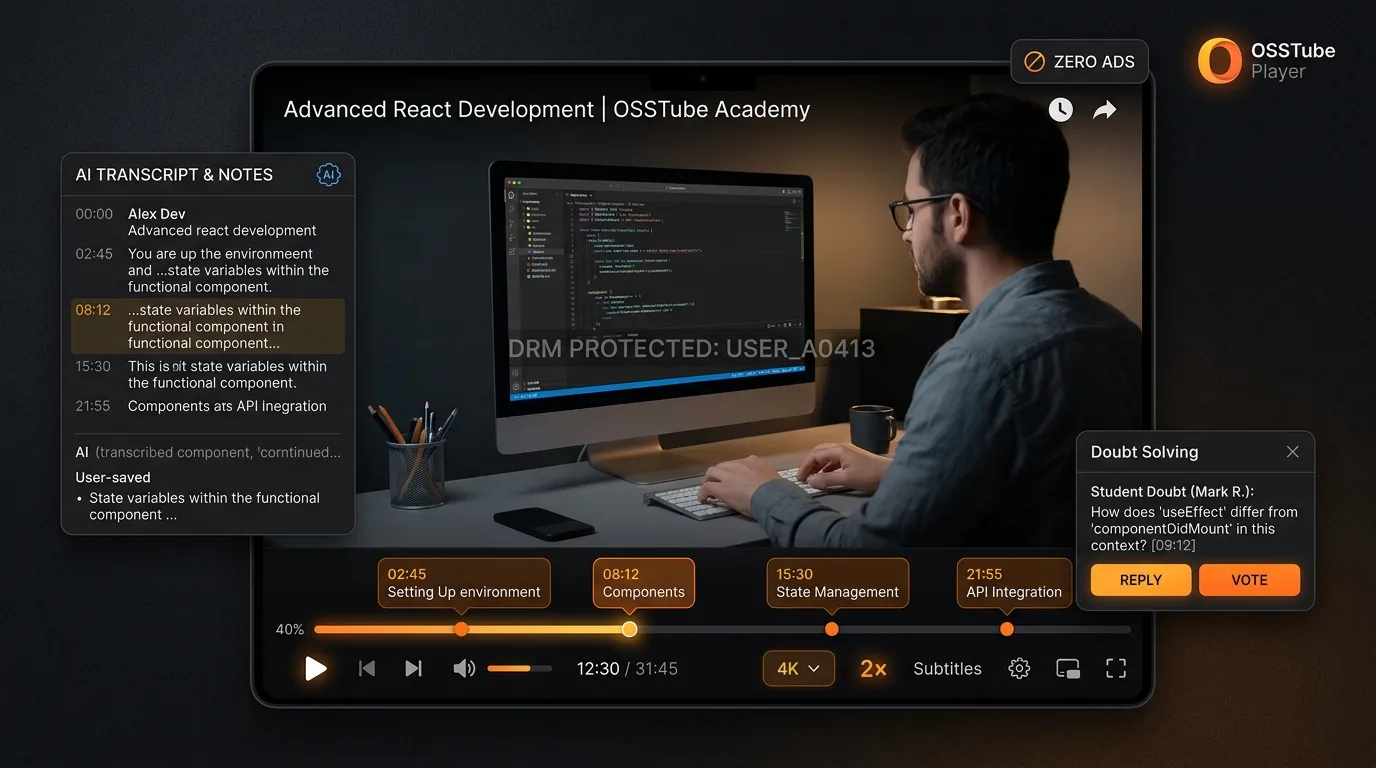
Run Your Videos with OSSTube Player
We have developed our own high-performance, proprietary OSSTube Player. Any YouTuber, Educator, or IT Mentor can run and monetize their self-hosted videos with complete peace of mind — free from YouTube's commercial ads, revenue cuts, and piracy risks.
🛡️ DRM Anti-Piracy
Dynamic user watermarks protect courses against illegal recording and sharing.
🚫 Zero 3rd-Party Ads
100% focused learning environment with zero external popups or commercials.
📝 AI Transcript & Notes
Searchable spoken keywords, automated chapters, and 1-click concept jumping.
💬 In-Player Doubt Chat
Students pin doubts directly at timestamps; mentors resolve them in-context.
OSSTUBE ENGINE v2.4 • 4K ULTRA HD
Video Management Architecture
Structured workflows designed for creators, IT trainers, and corporate institutions.
AI-Enhanced Video Uploads
Secure & Smart Content Management
OSSTube provides enterprise-grade video management. Direct uploads for proprietary content or AI-assisted import for existing libraries. Our system optimizes every video for global delivery.
Key Highlights & Benefits:
Direct Upload: Secure hosting for corporate and exclusive content
AI Import: Seamlessly integrate external video assets
Smart Tagging: Automatic genre and topic classification
Campaign Manager: Organize videos for marketing or education
High-Fidelity Support: Support for HD educational content
Bulk Processing: Efficiently handle large course libraries
📤 Upload Steps:
Access 'Content Manager' from your dashboard
Select 'Upload New' or 'Import Library'
Add metadata: Title, Educational Goal, and Target Audience
Upload high-res thumbnail or let AI generate one
Assign to 'Course' (Curriculum) or 'Campaign' (Marketing)
Publish instantly to your private or public channel
Your intellectual property is safe with us. Our upload process is designed for speed, security, and ease of use for busy educators and administrators.
Content Library Management
Organize at Scale
Manage thousands of educational assets with ease. Our library management tools allow you to filter, search, and organize content into coherent learning paths.
Key Highlights & Benefits:
Centralized Hub: View all your educational assets in one place
Advanced Filtering: Sort by performance, topic, or date
Quick Edits: Update metadata without re-uploading
Visual Grid: Thumbnails and quick-stats for every video
Course Mapping: See exactly which course uses which video
Status Review: Instant visibility on active/draft content
Organization is key to scaling education. We provide the tools to keep your digital campus orderly and efficient.
Dynamic Content Updates
Keep Your Curriculum Current
Education evolves, and so should your content. Update video details, replace source files, or modify access permissions instantly across all enrolled courses.
Key Highlights & Benefits:
Instant Updates: Changes reflect immediately for all students
Thumbnail A/B Testing: Optimize click-through rates
Version Control: Replace video files while keeping analytics
Campaign Switching: Move videos between marketing and curriculum
Featured Content: Highlight key lectures on your profile
Metadata Enrichment: Add new tags/keywords for better SEO
✏️ Editing Steps:
- Select video from 'Library Manager'
- Edit core details: Title, Description, Learning Tags
- Upload new thumbnail if needed
- Use 'Replace Source' to update video content
- Update 'Campaign' status for marketing rotation
- Save changes to propagate updates globally
Stay agile. In the fast-moving world of tech and AI, the ability to update your curriculum instantly is a superpower.
Content Quality Guidelines
Standardizing Educational Excellence
To ensure the highest quality learning experience, we maintain strict standards for video and audio fidelity. These guidelines help your content look and sound professional.
Key Highlights & Benefits:
Resolution: 1080p or higher recommended for clear visibility
Audio Quality: Clear voice-over with minimal background noise
Format: MP4/WebM supported for broad compatibility
Professionalism: Content must meet educational community standards
Originality: Plagiarism and copyright checks are mandatory
Relevance: Content should align with stated learning objectives
⚡ Policy Highlights:
- Fair Use: Efficient storage for active educational content
- Cloud Integration: Unlimited linking from external libraries
- Ownership: You retain 100% rights to your uploaded material
- Compliance: Adherence to global educational data standards
Quality builds trust. By adhering to these standards, you ensure that every student has a premium learning experience on OSSTube.
Smart Storage Optimization
Efficient Resource Management
Our AI optimizes storage based on content engagement. Active course materials are cached for global edge delivery, ensuring lightning-fast playback for students.
Key Highlights & Benefits:
Edge Caching: Content delivered from server nearest to student
Auto-Archiving: Unused drafts are archived to save workspace
Smart Compression: High quality, low bandwidth consumption
Lifecycle Management: Automated tools to retire outdated content
Priority Tiering: Premium course content gets highest priority
Data Safety: Redundant backups for all active curriculum
📅 Smart Storage Timeline:
| Upload Date: | Content Ingest |
| Active Status: | High-priority Edge Delivery |
| Archival Policy: | Auto-archive for dormant clips |
| Content Retrieval: | Instant restoration when needed |
| Bandwidth Optimization: | AI-driven bandwidth management |
Ensures best performance for active students
We manage the infrastructure so you don't have to. Fast, reliable, and efficient storage means your students never face buffering.
Content Archival & Lifecycle
Managing Outdated Materials
When content becomes obsolete, our lifecycle management tools help you retire it gracefully without losing historical data or student records.
Key Highlights & Benefits:
Soft Delete: Remove from public view but keep records
Historical Data: Retain analytics even for archived videos
Curriculum Integrity: Previous student cohorts retain access if needed
Clean Dashboard: Archive old content to declutter your workspace
Restoration: One-click restore for accidentally archived items
Compliance: Data retention according to educational regulations
🔄 Deactivation Process:
- Content marked 'Outdated' -> Moves to Archive
- Archived content hidden from new enrollments
- Past students retain access (optional)
- Analytics preserved for historical reporting
- Permanent deletion available on request
Innovation requires pruning the old. We make it safe and easy to keep your curriculum fresh while preserving your institutional history.
Educator Support Console
24/7 Technical Assistance
Never let a technical glitch stop a class. Our support console offers instant AI diagnosis and priority human support for Educators and Institutions.
Key Highlights & Benefits:
AI Diagnostics: Instant fix suggestions for upload issues
Priority Access: Fast-track lane for Institutional partners
Video Forensics: Detailed technical analysis of failed uploads
Dedicated rep: Account manager for Enterprise plans
Knowledge Base: Extensive library of 'How-to' guides
Uptime Guarantee: SLA-backed reliability for live courses
🤝 Priority Support Channels:
• Live Chat: Instant AI & Human support
• Ticket System: For complex technical queries
• Email: support@osstube.com
• Enterprise Line: Direct phone access
• Response Time: < 30 mins for Critical Issues
You are doing important work. We are here to ensure nothing stands in your way. Support is just a click away.
Educator Terms of Service
Agreement Summary
By using OSSTube, you agree to uphold our educational standards. These terms ensure a safe, professional, and reliable environment for millions of learners.
Key Highlights & Benefits:
Rights: You own your content; we just host it
Responsibility: You vouch for content accuracy and originality
Safety: No harmful, misleading, or inappropriate content
Fairness: Honest pricing and curriculum representation
Privacy: Respect student data and confidentiality
Continuity: Commitment to finish active courses for enrolled students
⚠️ Important Terms:
• Agreement: Usage implies acceptance
• Standardization: Uniform quality rules for all
• Protection: DMCA and IP safe-harbors
• Dispute Resolution: Fair arbitration process
• Updates: Terms evolve with platform features
• Data Export: Your data is portable anytime
Clear agreements make for long partnerships. We are committed to your success and the safety of our shared student community.
Marketing & Course Content
Strategic Video Classification
Distinguish between core 'Curriculum Content' and 'Promotional Material'. Our system handles them differently to optimize your reach and student retention.
Key Highlights & Benefits:
Curriculum Video: Part of the paid/gated learning path
Promotional Video: Free content for marketing/previews
Flexible Toggling: Convert free webinars to paid modules easily
Analytics Separation: Track marketing views vs. student engagement
Banner Features: Pin key promotional videos to your profile
Cross-Promotion: Use promo videos across multiple courses
📹 Video Types Classification:
Course Video:
Core Product - Optimized for Learning
Campaign Video:
Marketing Asset - Optimized for Reach
Grow your school while teaching your students. Our tools help you manage both the business of education and the art of teaching.